Which marketing roles to add first to a Grok Bot marketing team
Building a Grok Bot marketing team starts with deciding if you need a strategy or immediate execution. If your priorities are unclear, add the Chief Marketing Officer or Audience Strategist first to map out your plan. If you already know which channel needs work, add the specific specialist for that channel, like the SEO Specialist or Video Marketer. You act as the manager, taking the briefs from the planning roles and passing them to the specialists.
Do Grok Bot roles work together as a team on their own?
The roles do not automatically network with each other. Buying several templates does not link them; each one is a separate bot in your account.
They work as a team only after you add several copies to your account and assign work. You act as the router for the information. You can share a single chat with multiple roles, or copy the output from one role and paste it into another role's chat as its task. The ExtraHeads case study shows one owner working this way across several roles.
Which role should you add first?
The best first role depends on your current situation. If your priorities are unclear and you need to allocate a budget, add the Chief Marketing Officer first. If you need to figure out who your target customer is, start with the Audience Strategist. If you have not yet chosen between Grok Bot and ChatGPT, the Grok vs ChatGPT for marketing comparison shows how to test both on one real task first.
If you have one urgent channel, add that specialist first. For example, if search is the gap, begin with the SEO Specialist and read how to brief an SEO bot.
What roles are there, grouped by job?
ExtraHeads sells 22 ready-made AI marketing role templates for Grok Bot. The homepage groups them into six categories by the job they do.
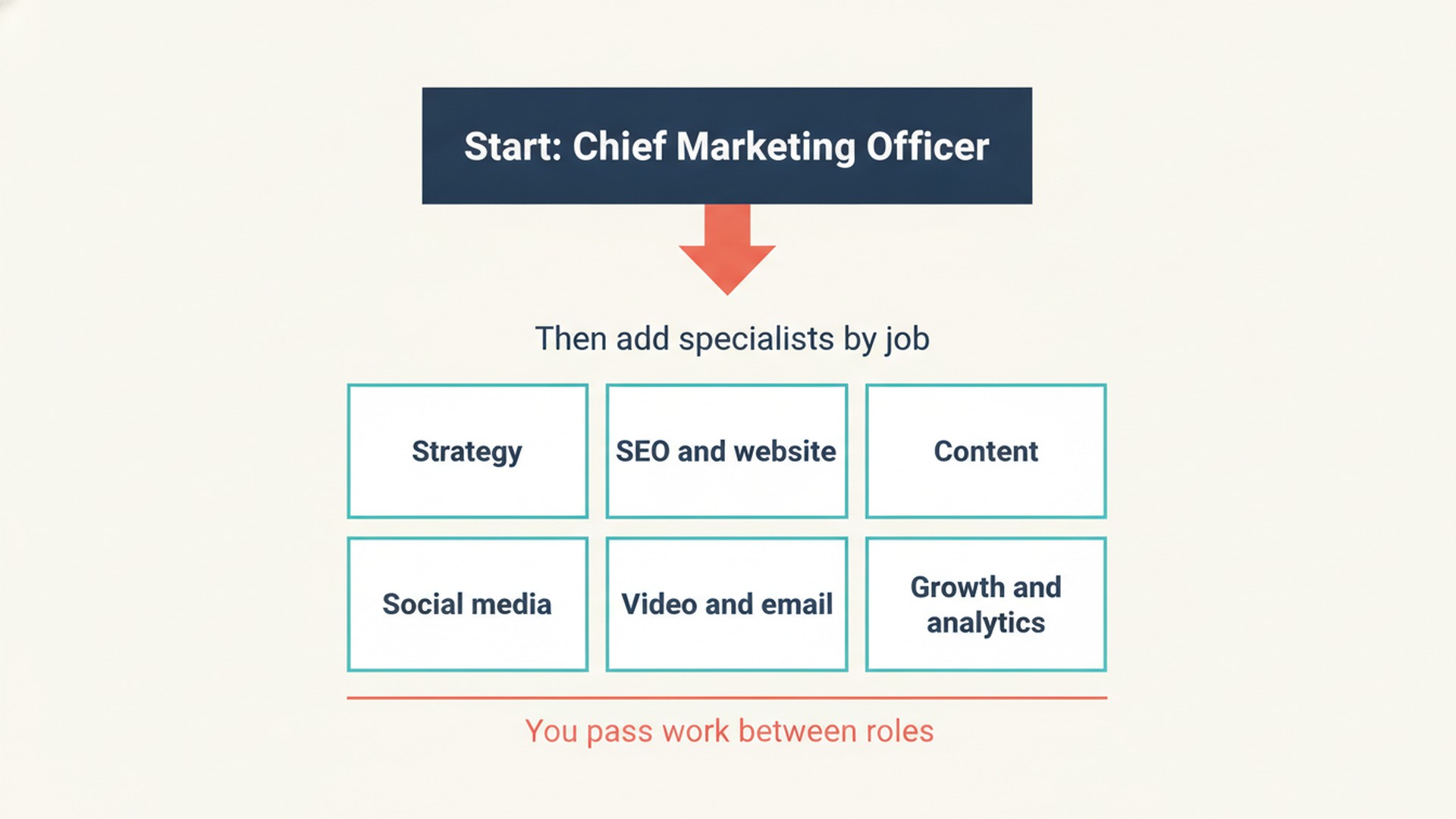
- Strategy: Chief Marketing Officer, Audience Strategist.
- SEO and website: SEO Specialist, Website Marketer and CRO Specialist, Landing Page Builder.
- Content: Content Marketer, Creative Ideator, Creative Designer, Editor and Fact-Checker.
- Social media: Telegram Specialist, Instagram, Facebook, and Threads Specialist, LinkedIn Specialist, TikTok Specialist, Pinterest Specialist.
- Video and email: Video Marketer, Webinar Producer, Email Specialist.
- Growth and analytics: Organic Growth Specialist, Partnerships Manager, PR Manager, SERM Specialist, Web Analyst.
Which roles work well next to each other?
Each role page lists its neighboring roles, the roles it hands work to or takes work from. The SEO Specialist page lists the Content Marketer, Web Analyst, Website Marketer and CRO Specialist, and Editor and Fact-Checker. When the SEO Specialist and Web Analyst work from the same site, this guide to sharing Search Console and GA4 data shows which reports to export for each. To see the SEO Specialist, Content Marketer, Editor and Fact-Checker and Web Analyst steps on one real article, read the SEO content workflow case study.
All five social media role pages list the Creative Designer as a neighbor, because the designer turns post concepts into layout specs. The Video Marketer page lists the Creative Designer, SEO Specialist, Landing Page Builder, and Organic Growth Specialist. The social media roles guide covers each platform.
What does a CMO brief look like before you hand it to another role?
The Chief Marketing Officer drafts detailed execution briefs for other specialists. In the CMO sample for a fictional brand called Kettle & Crow Coffee, the role prepares a campaign prioritization table. This table rates five initiatives by Impact, Confidence and Ease, noting the evidence needed and the next owner action.
The CMO also writes a specific brief for the Email Specialist to build a three-email spring subscription sequence. It also maps one core asset, a long-form spring roast guide, into channel cuts assigned to roles such as the LinkedIn Specialist and the Instagram, Facebook, and Threads Specialist. You then carry each brief to that role yourself.
When is the full set of 22 worth it over single roles?
ExtraHeads templates cost $19 USD per role, or $99 USD for the complete set of all 22 roles. This is a one-time payment with no subscription.
Buying the full set is worth it if you plan to use six or more roles. If you only need a few specific jobs done, purchasing single roles will cost less overall. You can read more about what the templates include in our free vs paid templates guide.
What do you still do yourself?
You remain in charge of the entire process. You open the template link, select Add to Grok Bot, review the template, and confirm Add Bot to create your own copy. After that, you brief the role on your business and give it tasks.
The roles produce drafts and plans from the data and summaries you share. They do not publish, send, or change anything on their own. You review and approve every step, and you must publish or implement the final work yourself. For a full breakdown of these boundaries, see what AI marketing bots can and cannot do.